The Pragmatic Guide to Vetting Digital Tools and Technology Solutions

September 28, 2026 · 19 reads
Introduction
Anyone who has tried to adopt a new digital tool recently knows the exhaustion of modern software shopping. Type a basic operational need into any search engine, and you are immediately flooded with dozens of options. Every landing page features clean gradients, glowing recommendations, and promises to streamline your day-to-day work. On the surface, half of these tools look nearly identical.
Dig a few layers down, however, and the reality changes quickly. Two products with matching feature lists often operate completely differently under the hood. They diverge across data privacy policies, architectural dependencies, deployment constraints, API reliability, user licensing structures, and ongoing operational overhead.
Picking the wrong tool rarely just wastes a monthly subscription fee; it burns team energy, stalls workflows, and creates painful migration debt down the line. Avoiding those traps requires approaching software evaluation with a structured, step-by-step framework rather than relying on vendor marketing or casual recommendations.
Start With the Problem You Need to Solve
The most frequent mistake in technology research is shopping for tools before understanding the internal bottlenecks you actually face. When you browse products first, vendor marketing subtly reshapes your expectations, tempting you to buy features you will never use to solve problems you do not have.
Solid research starts with an honest internal audit. Before opening a single product homepage, map out your baseline constraints:
- The Core Bottleneck: Define the exact problem you want to eliminate. State it plainly: “We lose three hours every week manually copying lead data into our billing database,” rather than “We need a faster pipeline.”
- Must-Have Capabilities: Separate strict functional requirements from nice-to-have conveniences. If an application lacks a mandatory capability, cross it off immediately.
- User Profile and Team Size: Consider who will actually use the software. Does the team need a dead-simple interface, or do they require complex command-line controls and granular permission settings?
- Integration Needs: Identify the existing databases, communication channels, and identity providers that the new software must integrate with on day one.
- Budget Realities: Determine what you can realistically spend, factoring in upfront onboarding fees, recurring seat costs, and potential usage surcharges.
- Deployment Model: Decide whether organizational policies require an on-premises setup, a dedicated virtual private cloud (VPC), or a standard multi-tenant cloud service.
- Privacy and Compliance: Document non-negotiable security requirements, such as regional data residency rules, encryption standards, or internal audit guidelines.
- Scalability: Estimate your data volume and user growth over the next twelve to twenty-four months to ensure the tool will not buckle under normal expansion.
Build a Research List
Once your internal requirements are clear, compile an initial candidate pool. Relying solely on standard web searches usually surfaces the companies with the biggest advertising budgets rather than the products best suited to your specific setup.
To uncover a broader mix of established platforms and focused tools, consult a curated software directory. Exploring organized category indexes and technical hubs helps you discover practical options you might otherwise overlook.
Once you have gathered five to eight potential candidates, you can set up a structured software comparison to evaluate them side by side against identical operational criteria, rather than getting distracted by differing marketing pitches.
Look Beyond the Feature List
A lengthy checklist of features looks impressive on paper, but feature counts rarely indicate everyday usability. A platform that claims to handle twenty distinct tasks often executes them awkwardly, whereas a specialized tool focused on five core workflows may integrate seamlessly into your daily routine.
Look closely at the practical realities of owning and maintaining the tool:
Everyday Ergonomics and Setup Complexity
How long will it take a new hire to become productive with the software? If simple configurations require weeks of specialized consulting, the tool brings hidden friction that offsets its initial advantages.
Integration Depth and API Health
Does the tool connect through native, event-driven webhooks and reliable endpoints, or does it depend on brittle third-party connectors that break whenever a schema changes? Check the vendor’s developer documentation to see how easily you can export your data if you need to migrate later.
Operational Overhead and Administration
Consider the ongoing effort required to manage access permissions, run updates, monitor security logs, and resolve technical issues. A tool that demands constant administrative supervision can quickly drain internal resources.
Read Reviews With Context
Customer reviews offer valuable glimpses into how software functions in the real world, exposing hidden bugs, unexpected performance slowdowns, and lagging customer support. But peer feedback must be evaluated with a healthy degree of skepticism.
Reviews are inherently subjective and often reflect extreme experiences—either an enthusiastic user in their first week or an upset customer venting about a minor configuration issue.
To pull dependable insights from peer feedback, look for specific verification signals:
- Operational Relevance: Prioritize reviews written by teams working in your industry, operating under similar compliance rules, and handling comparable workloads.
- Specific Details: Value reviews that describe precise workflows, actual configuration hurdles, and measured performance metrics over vague endorsements.
- Recency: Modern cloud applications update rapidly. Pay closest attention to feedback published within the last year, as older comments often complain about bugs that have already been patched.
- Verifiable Information: Separate documented operational facts from subjective styling preferences.
Reading balanced, independent software reviews alongside vendor changelogs and community forums gives you a far clearer picture of long-term software stability. Thoughtful software reviews consistently highlight the trade-offs of each platform, helping you prepare for implementation realities.
Research AI Tools Carefully
Evaluating artificial intelligence tools and automated systems introduces complexities that standard deterministic software simply does not have. Machine learning tools produce probabilistic outputs, run on variable pricing structures, and handle sensitive business data in unique ways.
Browsing a dedicated AI tools directory is an effective way to explore emerging utilities, from domain-specific assistants to autonomous pipeline tools. When you sit down to compare AI tools, move beyond scripted vendor demonstrations and test for real-world reliability:
- Domain Specialization: Determine whether the tool is just a thin wrapper around a public foundation model or a fine-tuned engine tailored to your specific field.
- Accuracy and Verification: Check whether the model provides citations, enables determinism controls, and offers clear ways to verify generated output.
- Data Privacy Policies: Examine vendor policies to confirm that your proprietary data and prompts will not be retained to train public models.
- Latency and Cost Models: Understand how expenses scale. Token pricing, API call minimums, and compute overages can escalate quickly under heavy workloads.
- Workflow Compatibility: Ensure the tool fits into your current stack through stable APIs, SDKs, or pre-built connectors rather than requiring manual copy-pasting.
Online roundups often attempt to crown the best AI tools, but true quality depends entirely on your specific use case, data volume, and accuracy thresholds. What works well as a brainstorming assistant for a freelancer may prove unviable for an enterprise processing regulated client records.
Evaluate Business Software
Evaluating business applications for multi-person teams requires a different lens than choosing software for personal use. A single application can affect dozens of colleagues, making governance, collaboration, and change management primary concerns.
Carrying out a systematic business software comparison helps ensure that candidate platforms meet organizational compliance standards without making everyday tasks harder for staff.
Keep these core operational factors in mind:
- Access Governance: Verify support for granular role-based permissions, multi-factor authentication, and automated directory provisioning through SAML and SCIM protocols.
- Implementation Timelines: Clarify how long implementation will take, whether you will need outside consulting support, and how much training your staff will require.
- Scalability and Pricing Tiers: Watch out for sudden price jumps when your team crosses seat thresholds, and check for add-on fees for essential administrative tools.
- Audit Trails: Ensure the platform logs administrative changes, permission updates, and data exports to support internal compliance reviews.
Because organizations balance different security standards, legacy systems, and team habits, two companies evaluating the exact same software category often arrive at completely different, equally sensible choices.
Create a Shortlist
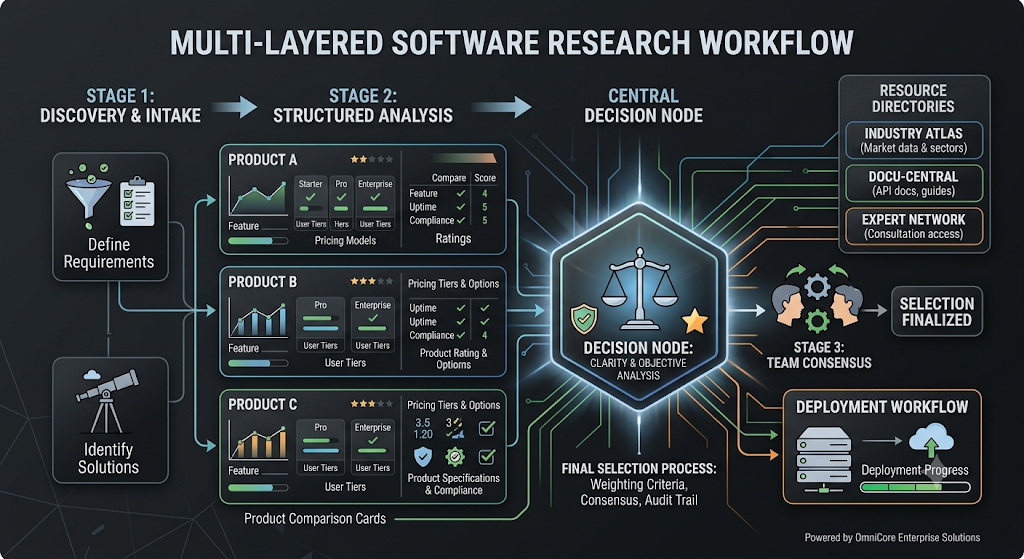
Following a structured evaluation workflow keeps your research focused and prevents decision fatigue.
- Define the Problem: Write down a clear summary of the operational bottleneck you need to resolve.
- Identify Must-Have Requirements: List the non-negotiable features, compliance standards, and integration needs your team requires.
- Discover Candidates: Gather five to eight potential solutions through directories, professional forums, and trusted technical resources.
- Filter Out Mismatches: Discard tools that fail basic prerequisites, exceed your budget, or lack essential integrations.
- Compare Remaining Options: Map your remaining three or four candidates against uniform operational criteria.
- Examine Available Evidence: Cross-check vendor claims against independent evaluations, technical documentation, and community discussions.
- Verify Crucial Details: Check active pricing tiers, contractual minimums, and privacy policies directly with official vendor materials.
- Test Practical Workflows: Run hands-on sandbox trials with your top two choices using realistic data.
- Make an Informed Choice: Choose the tool that best satisfies your documented functional criteria, budget, and operational constraints.
Using this disciplined sequence makes it obvious why the recognized best software tools are never universal—they are simply the options that best match a team’s documented operational needs.
Verify Important Information
Software vendors update their features, pricing tiers, and terms of service on a regular basis. Information gathered from secondary reviews or older comparison articles can become outdated quickly.
Before signing a contract or committing company workflows to a new tool, confirm key specifications directly:
- Inspect Official Documentation: Review current API specifications, supported data schemas, and system status dashboards.
- Review Contract Terms: Clarify renewal terms, data export policies, and potential penalties for changing seat counts.
- Verify Compliance Certifications: Request up-to-date compliance reports (such as SOC 2 or ISO certificates) directly from the vendor’s security team.
How BestAIToolix.com Supports Software Research
BestAIToolix.com serves as an evidence-driven software discovery, research, ranking, and comparison platform built to help buyers and technical teams make informed technology decisions.
The site covers essential technology categories, including artificial intelligence, DevOps, cloud infrastructure, observability, cybersecurity, databases, project management, and business operations.
Readers can use BestAIToolix.com to:
- Explore structured software categories and specialized technical niches.
- Review detailed product profiles outlining deployment options, integrations, and capabilities.
- Compare alternative solutions across consistent functional criteria.
- Discover emerging machine learning utilities and specialized tools.
- Consult an informative software buying guide to understand common licensing traps, integration challenges, and evaluation criteria for specific software categories.
While discovery resources like BestAIToolix.com provide an organized foundation for category exploration, teams should always validate technical details through hands-on testing, vendor security reviews, and official documentation before committing to a tool.
Frequently Asked Questions
How many tools should we test in a hands-on trial? Keep your hands-on trials to two or three candidates. Running detailed sandbox tests on more than three products strains team bandwidth, delays decisions, and rarely produces insights that could not be determined during earlier technical reviews.
Why are product feature matrices often misleading? Feature checklists treat complex capabilities as binary yes-or-no attributes. They tell you that an integration exists, but they do not show whether the data sync runs in real time, how often errors occur, or how difficult the interface is to navigate.
What is the best way to test software during a free trial? Avoid casually clicking through dummy templates. Instead, build a realistic simulation of your actual daily workflow using sanitized, non-sensitive data, and invite the colleagues who will use the tool daily to test it alongside you.
How can teams avoid unexpected costs with cloud tools? Carefully review contract minimums, annual renewal terms, data export fees, and consumption-based charges like API volume, storage, or token usage. Always ask vendors what happens to your pricing when your team or data grows.
Conclusion
Choosing the right software comes down to looking past marketing promises and evaluating tools against documented internal constraints, functional prerequisites, and actual operational requirements. By defining concrete problems, cataloging candidate tools, executing consistent evaluations, and validating data with verified user feedback, teams can minimize technical debt and avoid costly platform migrations.
Platforms like BestAIToolix.com provide valuable discovery capabilities, structured comparisons, and category documentation to inform early-stage software research. Ultimately, the success of any technology deployment rests on careful internal requirements gathering, thorough technical validation, and hands-on testing in realistic working environments.
Leave a Reply