Robot Fleet Management: Key Practices for Managing Robotic Systems

September 22, 2026 · 25 reads
Introduction
Developing a working robot application in a test lab is an exciting milestone. The robot navigates clean floors, avoids static cones, and never runs low on battery power while tethered to a workbench.
However, operating dozens or hundreds of robots in a warehouse, factory, or hospital creates a different set of problems.
In live facilities, machines deal with software version differences, intermittent wireless networks, and degrading battery cells. Sensor lenses collect dust, drive motors face mechanical strain, and navigation failures occur in busy aisles. When machines experience issues in the field, teams need clear operational systems. They must collect telemetry, review logs, dispatch updates remotely, and schedule physical maintenance without disrupting ongoing operations.
RobotOps provides the operational structure needed to run physical robots reliably at scale.
What Is RobotOps?
RobotOps is the practice of applying modern software engineering, DevOps, automation, monitoring, testing, and lifecycle-management methods to robotic systems.
Rather than treating a robot as a finished hardware appliance, RobotOps treats it as a connected edge system. It links multiple technical areas:
Robotics + Software Engineering + DevOps + Automation + Observability + Operations
Robotics provides physical mechanics, sensors, and motion control. Software engineering delivers application code and testing practices. DevOps and operations provide continuous delivery pipelines, monitoring, and fleet management.
A complete RobotOps lifecycle connects nine key stages:
- Develop: Write modular robot software, drivers, and control algorithms.
- Simulate: Test software inside virtual environments to catch motion bugs early.
- Test: Validate code on physical test benches and staging hardware.
- Deploy: Deliver software updates in controlled stages over the air.
- Monitor: Collect live telemetry, system metrics, and task status from the fleet.
- Detect: Use automated rules to spot sensor errors, stalled units, and performance drops.
- Respond: Isolate affected machines, run remote diagnostics, and reassign urgent tasks.
- Update: Fix root causes, verify patches, and distribute tested releases.
- Review: Analyze incident data to improve future software and maintenance schedules.
For example, consider an automated floor scrubber deployed across a chain of grocery stores. Writing the navigation code gets the machine moving. RobotOps handles what happens across the next five years. It manages software updates for one hundred scrubbers, tracks brush motor wear, and makes sure units return to charging stations before batteries run out.
RobotOps does not follow one universal formal standard. Different engineering teams select different tools based on their systems. However, the core purpose is consistent: keeping physical robots working safely, predictably, and efficiently.
Why Robotics Operations Are Different
Operating robotic systems differs significantly from operating ordinary software applications.
In traditional cloud computing, an application runs inside a climate-controlled data center. If a web service crashes, an automated script restarts the container in seconds. No physical damage occurs, and end users rarely notice more than a momentary delay.
Robots interact directly with the physical world. Operational failures often involve software and physical hardware at the same time:
- Physical hardware: Drive motors heat up, wheel treads wear down, and mechanical joints loosen over time.
- Sensors: Cameras collect dust, lidars experience optical glare, and depth sensors struggle in direct sunlight.
- Actuators and controllers: Microcontrollers and motor drivers experience mechanical vibration and electrical noise.
- Batteries: Batteries drain under heavy loads. If a robot cannot reach a charger, it halts wherever it stands.
- Networks: Concrete pillars, metal racks, and wide floor plans create dead zones that drop wireless connections.
- Edge devices: Onboard computers must process heavy sensor data locally under strict power and thermal limits.
- Physical environments: Workers walk into paths, boxes fall, and floor surfaces change from slick tile to rough concrete.
- Safety requirements: A software bug in a cloud service returns an error log. A software bug on a 150-kilogram mobile robot can strike machinery, damage goods, or injure workers.
Because of these dependencies, software failures can directly affect physical operations. For example, if a navigation algorithm times out on noisy sensor data, a warehouse robot can stop in an active travel lane, blocking other machines behind it. Operations teams must understand both the code and the physical machine.
RobotOps vs DevOps
RobotOps builds directly on DevOps principles. Both models value version control, continuous integration, automated testing, staged rollouts, and active monitoring.
However, RobotOps extends these concepts into physical spaces where machines move and conditions change.
| Area | DevOps | RobotOps |
| Focus | Software systems | Software plus robotic systems |
| Infrastructure | Servers, cloud, containers | Robots, controllers, networks, edge systems |
| Monitoring | Applications and infrastructure | Robots, telemetry, sensors, tasks, connectivity |
| Testing | Software and infrastructure | Software, simulation, hardware, and operational testing |
| Deployment | Application releases | Robot software and configuration updates |
| Incidents | Software and infrastructure failures | Software, hardware, navigation, network, and operational failures |
The main difference comes down to the operating environment. DevOps assumes computing hardware is stationary, protected, and continuously connected. RobotOps assumes target machines are mobile, intermittently disconnected, and subject to physical wear and tear.
Robot Fleet Management
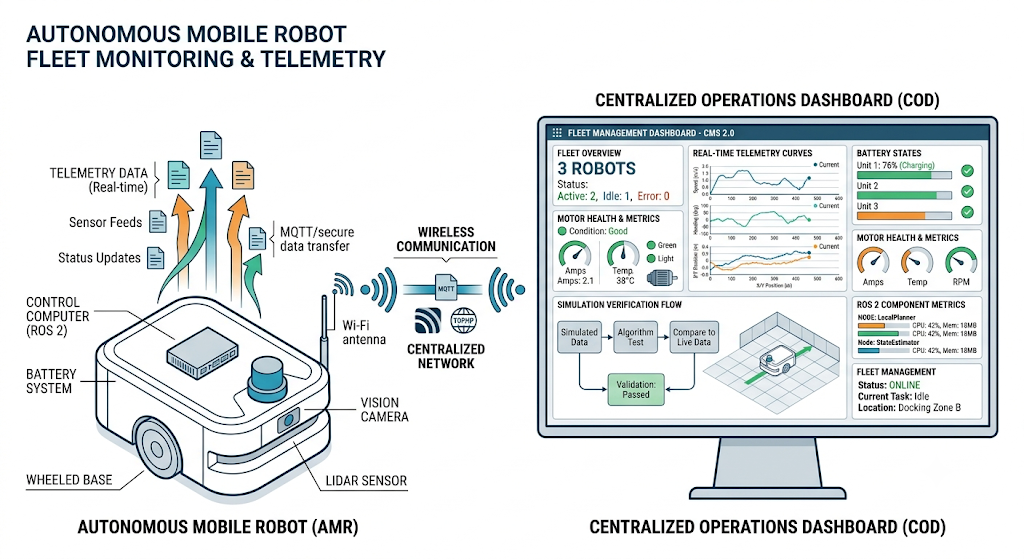
Robot Fleet Management is the practice of tracking and coordinating multiple robots across one or more facilities.
Managing one robot can often be done manually. An engineer can walk over to a stopped unit, connect a debug cable, inspect terminal logs, and swap batteries by hand.
When an organization runs dozens or hundreds of robots, manual oversight is impossible. Centralized fleet management software provides operational control over:
- Robot identity: Managing digital certificates and unique device identifiers.
- Robot location: Showing real-time positions on facility map overlays.
- Battery status: Tracking state of charge, discharge rates, and charging dock availability.
- Connectivity: Monitoring Wi-Fi signal strength and packet loss across different facility zones.
- Software versions: Verifying running application versions and configuration parameters across units.
- Task status: Assigning jobs to the nearest available machine with sufficient battery power.
- Telemetry and alerts: Streaming operational health signals and raising flags when a unit stops moving.
- Remote operations: Allowing support engineers to safely inspect stopped machines.
- Configuration: Syncing map updates and parameter changes across the fleet.
- Software updates: Scheduling and distributing over-the-air software updates.
In a warehouse, for example, a fleet manager coordinates fifty autonomous mobile robots moving pallets. If one unit reports high motor temperatures while carrying a load, the fleet system reassigns the job to a nearby robot and directs the hot unit to cool down. Centralized visibility prevents traffic bottlenecks and avoids operational downtime.
The Robotics Operations Center
A Robotics Operations Center (ROC) acts as the central operational system for a robotics deployment.
A ROC does not have to be a physical room with wall-mounted screens. For many engineering teams, a ROC is a secure software platform that brings together dashboards, telemetry streams, and remote management tools into one interface.
An operations center typically provides visibility into:
- Robot health: Hardware fault codes, motor temperatures, and supply voltages.
- Fleet status: High-level views of active, charging, idle, and faulted units.
- Telemetry: Streaming real-time speed, battery, and diagnostic data.
- Metrics: Tracking task completion times, distance traveled, and error rates.
- Logs: Aggregating runtime logs for post-incident reviews.
- Alerts: Routing urgent issues to on-call technicians while filtering minor noise.
- Software versions: Tracking which software packages are installed on each unit.
- Deployments: Monitoring software rollout progress across site groups.
- Incidents: Managing open support tickets and hardware repair workflows.
- Maintenance: Scheduling mechanical inspections based on operating hours.
Centralized visibility helps operations teams detect small anomalies before they cause widespread facility disruptions.
Robotics Software and ROS 2
Robotics software handles everything from low-level motor drivers to high-level motion planning. In modern robotics, a large portion of the community builds applications using ROS 2 (Robot Operating System).
ROS 2 is not an operating system in the traditional sense like Linux. It is a modular software framework and middleware layer that lets different programs inside a robot communicate with each other.
Key ROS 2 building blocks include:
- Nodes: Small, single-purpose executable programs. One node reads camera frames, another runs motor controls, and a third calculates navigation paths.
- Topics: Data buses over which nodes publish and subscribe to continuous data streams, such as sensor feeds.
- Messages: Standardized data structures sent over topics.
- Services: Request-and-response mechanisms used for quick state checks.
- Actions: Goal-oriented communication for longer tasks that provide continuous progress feedback.
- Middleware: An underlying Data Distribution Service (DDS) layer that routes messages between nodes.
Understanding these concepts helps RobotOps engineers understand communication between software components. Operations teams must manage ROS 2 deployments, configure node launch parameters, diagnose communication drops across the middleware, and collect node logs during unexpected stops.
The Role of Robot Simulation
Testing software updates directly on physical hardware can be slow, costly, and hazardous. If an obstacle-avoidance algorithm has a bug, testing it on a physical robot could drive a steel chassis into a conveyor belt.
Robot simulation provides a safe, virtual environment to test code changes before touching physical machines.
Simulation helps teams in several ways:
- Test navigation: Check how path planners handle narrow doorways, tight turns, or crowded corridors.
- Test software changes: Run automated regression suites against new software builds.
- Reproduce failures: Replay sensor logs from a field failure inside a virtual world to find the root cause.
- Test unusual conditions: Simulate extreme edge cases, like sudden sensor outages or slippery floors, without physical danger.
- Validate robot behavior: Confirm that a robot yields to obstacles correctly before deploying updates.
- Test workflows: Verify fleet dispatch logic across simulated facility layouts.
- Prepare deployments: Ensure that a new software package installs and runs cleanly.
Simulation reduces testing risks and catches obvious bugs early. However, simulation does not replace all physical testing. Virtual models cannot fully reproduce subtle floor traction changes, dirty lenses, or mechanical wear. Physical validation on staging units remains essential.
Monitoring and Observability
To run robots reliably, teams need deep visibility into system behavior. Simply knowing whether a robot is online or offline is not enough to maintain a fleet.
Effective observability relies on four primary components:
- Metrics: Numeric values tracked over time, such as battery levels, CPU load, memory usage, motor temperatures, network status, navigation failures, task completion times, command latency, and sensor errors.
- Logs: Time-stamped text records of operational events. When an algorithm crashes, logs capture the exact sequence of events leading up to the error.
- Telemetry: Continuous streams of operational health data sent from robots to central servers, including coordinates, battery discharge rates, and component states.
- Alerts: Automated notifications that fire when critical thresholds are crossed.
Alerts must be clear and actionable. If an operations dashboard triggers loud warnings for minor, temporary Wi-Fi drops, operators experience alert fatigue and begin ignoring notifications. Keep alerts focused on issues that require direct human intervention.
Robotics Automation
Manual maintenance does not scale. If a technician must manually connect a cable to update every machine, maintaining fifty robots consumes entire workweeks.
Robotics automation applies repeatable scripts and automated pipelines to common operational tasks:
- Provisioning: Automatically flashing operating systems, dependencies, and network keys onto new onboard computers.
- Configuration updates: Syncing updated site maps and parameter files across the fleet.
- Software deployment: Building container images and pushing them to target units over the air.
- Health checks: Running automated diagnostic checks on motors, sensors, and brakes before a shift starts.
- Automated testing: Running regression tests in simulation whenever developers commit new code.
- Log collection: Automatically uploading crash logs and sensor recordings when a robot halts.
- Fleet updates: Rolling out software patches in controlled, staged groups.
- Recovery workflows: Safely restarting frozen navigation nodes without rebooting the entire machine.
Controlled automation is essential because software changes directly affect physical systems. Critical updates should always include appropriate validation checks and rollback options.
Autonomous Mobile Robots (AMRs)
Autonomous Mobile Robots represent one of the most common commercial uses of RobotOps. These machines move goods inside warehouses, factories, logistics facilities, and distribution centers.
Operating an AMR fleet introduces specific daily concerns:
- Navigation: AMRs must steer around dynamic obstacles, yield to workers, and plan safe routes.
- Sensing: Lidars and cameras must remain clean and calibrated to detect low-profile obstacles.
- Battery management: Fleet software must schedule charging stops so robots do not run out of power mid-aisle.
- Task assignment: Matching available robots with open transport orders.
- Connectivity: Handling wireless roaming smoothly between access points.
- Fleet coordination: Managing intersections to prevent gridlock in narrow aisles.
- Monitoring: Tracking fleet uptime and detecting stalled units quickly.
- Maintenance: Inspecting drive wheels, cleaning sensors, and replacing worn parts regularly.
For example, if an AMR encounters an unmapped box in a warehouse aisle, it must decide whether to detour around it or stop safely and report the obstruction to the fleet manager.
Industrial Robotics
RobotOps also plays an important role in industrial robotics environments. Unlike mobile units, industrial robots are often stationary arms used for welding, assembly, inspection, and manufacturing automation.
These robots operate inside fixed work cells near high-speed machinery. Unplanned downtime on an assembly line can cost thousands of dollars per minute.
RobotOps supports industrial robotics through:
- Controlled deployment: Packaging updates and deploying them through verified release pipelines.
- Configuration management: Tracking every change to robotic arm motion scripts, tool offsets, and safety boundaries in version control.
- Condition monitoring: Tracking motor torque signatures, joint temperatures, and vibration over time to catch bearing wear before a joint fails.
- Simulation testing: Testing motion paths in simulation to prevent mechanical arms from colliding with fixtures.
- Maintenance: Scheduling component replacements based on runtime hours.
- Controlled updates: Scheduling updates during planned plant maintenance windows.
Physical safety is paramount in industrial environments. Software updates must never alter certified hardware safety interlocks or emergency-stop circuits.
Illustrative RobotOps Scenario
To see how these concepts connect in practice, review this illustrative scenario:
A logistics warehouse operates 50 autonomous mobile robots to move shelving units. The engineering team deploys a software update intended to improve obstacle avoidance around tight corners.
Two hours into the morning shift, the central dashboard shows an unusual trend. Eight robots in the packaging area stop moving and raise navigation timeout alerts.
The operations team resolves the incident through structured steps:
- Detection: Monitoring tools detect an increase in navigation failures on eight machines.
- Investigation: Engineers inspect logs and telemetry from the stopped units.
- Identification: They identify that failures occur only on robots running the new software version.
- Comparison: Affected robots are compared with healthy robots running the previous release.
- Rollout pause: The update rollout is paused to prevent other units from failing.
- Reproduction: In the development environment, engineers reproduce the issue in simulation using recorded sensor logs. They discover that bright morning light reflecting off metal shelving causes the new edge-detection code to misidentify open floor space as a solid wall.
- Fix and rollback: The eight stopped robots are rolled back to the previous stable release so they can resume work while developers fix the filter code.
- Testing: The corrected software version is tested across virtual test runs and verified on a physical staging unit.
- Staged release: The update is released in stages, deploying to two test robots first.
- Post-deployment monitoring: Fleet health is monitored closely after deployment to confirm normal operation.
This scenario is an illustrative example, not a real customer case study. It shows how monitoring, simulation, and staged rollouts resolve unexpected field issues quickly.
Security and Physical Safety
In standard software operations, a security breach puts data privacy and service availability at risk. In robotics, security directly affects physical safety. An unauthorized command sent to a robot’s drive system can cause mechanical collisions, equipment damage, or personal injury.
Core security practices include:
- Authentication and authorization: Restricting manual teleoperation and parameter changes to verified personnel.
- Access control: Enforcing role-based permissions across fleet tools.
- Device identity: Using unique hardware-backed digital certificates so unauthorized devices cannot join the fleet network.
- Secure communication: Encrypting all telemetry, API calls, and middleware messages over local and wide-area networks.
- Software integrity: Cryptographically signing software packages and configuration files before installation.
- Network security: Isolating robot operational traffic on dedicated, segmented networks.
- Audit logs: Maintaining tamper-proof records of who deployed software, updated settings, or issued manual drive commands.
- Controlled updates: Enforcing strict change-management reviews before deploying software to physical units.
- Remote-access controls: Using secure VPN tunnels or dedicated agents rather than opening raw ports to the internet.
Physical safety must never depend entirely on software. Certified hardware emergency-stop circuits and hardware-level safety laser scanners must be able to cut motor power mechanically if an obstacle gets too close, even if the onboard operating system freezes.
Common RobotOps Technologies
Teams select operational tools based on their robot architecture, fleet size, and work environment:
- ROS 2: Open-source framework providing node communication, sensor drivers, and motion packages.
- Simulation platforms: Physics engines and virtual simulators like Gazebo for testing navigation and control code.
- Monitoring tools: Time-series databases and visualization dashboards like Grafana for tracking fleet metrics.
- Logging systems: Log aggregators and search tools for analyzing runtime errors and crash dumps.
- Telemetry systems: Lightweight messaging protocols like MQTT or DDS for streaming health data from machines.
- CI/CD platforms: Automated build and test tools like GitHub Actions, GitLab CI, or Jenkins for running test suites.
- Container technologies: Docker and lightweight container runtimes for isolating application dependencies on edge hardware.
- Fleet management platforms: Centralized software for dispatching tasks, managing traffic, and tracking battery states.
- Cloud infrastructure: Cloud platforms used for centralized fleet coordination, historical data storage, and analytics.
- Edge infrastructure: Local facility servers that run low-latency fleet services and edge computing workloads.
- Configuration management tools: Tools for syncing parameter files, site maps, and calibration offsets across units.
Tool selection depends on the project. A small team running five indoor mobile carts does not need a complex distributed cloud stack. Simple, dependable tools are often the most reliable choice.
How to Start Learning RobotOps
Building operational robotics skills requires a practical, step-by-step roadmap:
Step 1 — Learn Robotics Basics
Understand basic kinematics, differential drives, sensors, actuators, controllers, and robot architecture.
Step 2 — Learn Linux and Networking
Understand process management, systemd services, bash scripting, permissions, networking fundamentals, and troubleshooting tools.
Step 3 — Learn ROS 2
Study nodes, topics, services, actions, messages, and communication middleware.
Step 4 — Learn Simulation
Practice testing robotic applications and navigation stacks in virtual environments.
Step 5 — Learn DevOps
Study Git version control, CI/CD pipelines, container packaging with Docker, monitoring concepts, and automation scripts.
Step 6 — Learn Fleet Operations
Understand telemetry streaming, fleet monitoring dashboards, over-the-air deployments, incident response, and preventative maintenance.
Step 7 — Build Practical Projects
Create small projects that connect robotics software with operational practices, such as running a simulated robot that streams metrics to a local dashboard and receives automated container updates.
Common RobotOps Challenges
Operating robots in production presents continuous engineering challenges:
- Hardware differences: Even identical robots have small manufacturing tolerances. Maintain unique calibration files separately from core software images.
- Software version drift: Manual field fixes cause machines to run mismatched configurations. Use immutable container images to keep software uniform across the fleet.
- Unreliable connectivity: Mobile units frequently drop off wireless networks. Design software to cache telemetry locally and continue active tasks safely while disconnected.
- Limited telemetry: High-frequency sensor streams consume heavy bandwidth. Stream lightweight health summaries continuously, and upload full diagnostic logs only during investigations.
- Difficult failure reproduction: Field bugs are hard to reproduce. Record sensor logs during failures so engineers can replay them inside simulators.
- Physical testing constraints: Testing on physical machines takes time and space. Use automated simulation runs to catch common bugs before staging hardware tests.
- Fleet-wide updates: A bad update can halt an entire facility. Always release software changes in small, staged batches.
- Security risks and safety requirements: Unsecured controls create physical hazards. Combine encrypted, role-based software controls with certified hardware emergency-stop circuits.
- Maintenance coordination: Mechanical components wear out over time. Track operational run hours and motor temperatures to schedule preventative maintenance before parts fail.
Technical Learning Resources
Operating robots in production requires continuous learning across software engineering, systems administration, and robotics hardware. Practitioners who want to explore detailed guides, tutorials, and technical material covering fleet operations, simulation, and modern robotics software practices can use RobotOps as an educational technical resource.
Frequently Asked Questions
What is RobotOps?
RobotOps is the operational practice of deploying, monitoring, updating, and maintaining robotic systems throughout their working lifecycle. It connects robotics engineering, software development, and operations to run physical robots reliably in production.
How is RobotOps different from DevOps?
DevOps manages virtual applications and cloud servers. RobotOps manages physical machines that move through real environments, use batteries, and rely on physical sensors and motors. Software failures in robotics directly affect physical operations and human safety.
What does Robot Fleet Management include?
Robot Fleet Management includes tracking robot locations, battery states, hardware health, network status, software versions, and active job assignments across multiple units. It also coordinates traffic to prevent deadlocks in shared spaces.
Why is ROS 2 useful for RobotOps?
ROS 2 provides a modular middleware framework that allows different robot programs to communicate reliably. RobotOps manages the deployment, configuration, logging, and health monitoring of those ROS 2 nodes in production.
Why is Robot Simulation important?
Simulation allows engineers to test software changes, path planning, and edge cases inside a safe virtual world. This helps teams catch software errors early without risking damage to physical hardware or causing facility downtime.
What does a Robotics Operations Center do?
A Robotics Operations Center provides a centralized operational view of fleet telemetry, error logs, deployment states, and alerts. It helps operations teams detect, diagnose, and resolve fleet issues quickly from a single interface.
How can someone start learning RobotOps?
Begin by mastering Linux systems administration, IP networking, and basic robotics kinematics. Then learn ROS 2, practice testing robot models in simulation, and explore container packaging, CI/CD pipelines, and time-series monitoring dashboards.
Conclusion
Developing functional robot software is an important engineering achievement, but operating robots in production requires an ongoing operational commitment. Reliable field robotics connects software engineering, simulation, testing, staged deployments, active monitoring, fleet coordination, and routine maintenance. RobotOps brings these activities together around physical systems in the real world. By investing in clear observability, automated maintenance pipelines, and disciplined lifecycle management, organizations can keep their robotic fleets working safely, reliably, and productively at scale.
Leave a Reply